
FAQ and tips
Resolve common Grunt questions about shapes, fonts, targeting, and overrides
Use this page for common questions about shapes, fonts, targeting, templates, and linked data.
#How do you resize shapes?
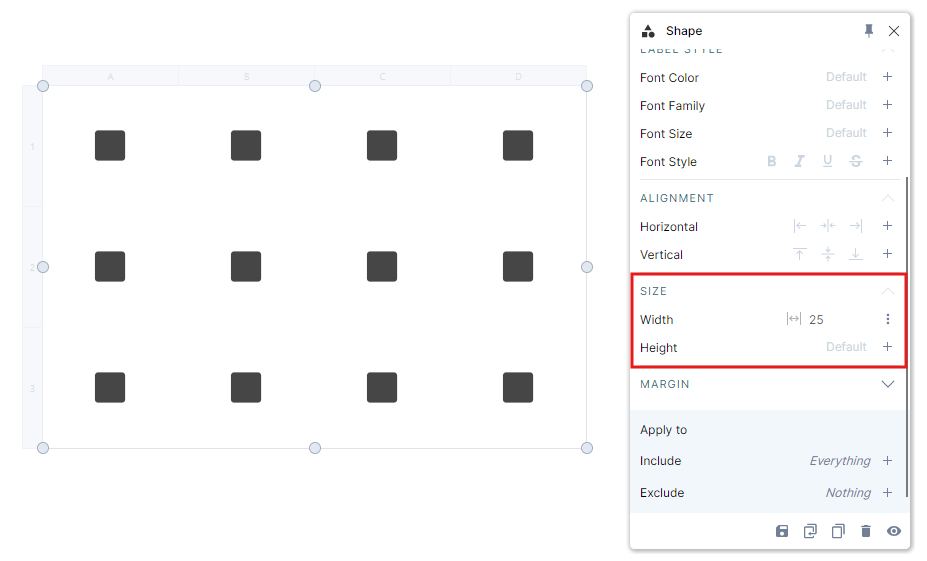
Open the shape directly or open its Shape rule, then adjust the size settings.
The Shape rule provides these size modes:
AutomaticInheritRelativeAbsoluteFit to contentFit to size
Use Relative when the object should size itself against its container. Use Absolute when it must stay at a fixed pixel value.
#How do you remove overridden data?
If linked data was changed directly in PowerPoint, Grunt marks the cell as overridden.
To remove the override:
- Open the data editor.
- Find the marked cell.
- Right-click it.
- Choose Reset cells to original value.
You can also clear all overrides from the warning control in the edge menu.
#How do you remove a shape?
You do not usually delete an individual Grunt shape the same way you would delete a native PowerPoint shape.
Instead, adjust the rule target:
- Add the cell to the rule's Exclude list
- Exclude empty cells when the shape is created only for empty cells
#Why does Grunt exclude instead of include?
Grunt prefers the target model that is most durable when the grid changes later.
For example, if you select all content rows except a header and add a rule, Grunt may exclude the header instead of explicitly including every current content row. That way, new content rows are automatically included.
#Why is a font missing?
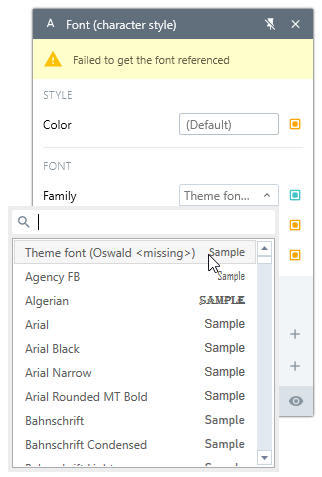
A yellow warning in the rule stack or Font rule can indicate that a font is unavailable. The font picker marks it as missing. The usual causes are:
- The font is embedded in the PowerPoint theme and unavailable through the Office API
- The font is custom and not installed on your machine
Fix path:
- Get the correct font files from IT or the font owner.
- Install the font locally.
- Restart PowerPoint.
The installed font name must exactly match the name used by the presentation. If you cannot install the font, switch the object to another available font.
#Why can a logo be missing in the logo rule?
Use a local logo folder when the built-in source cannot find the logo you need.
Match the cell text to the image file name and put the local folder first in Settings > Preferences > Logo sources. See the Logo rule for the full workflow.
#Templates from the Content Library look wrong on Mac
When inserting templates from the Content Library on Mac, slides may appear with old Grunt-branded graphical elements instead of your company's brand colors.
This happens because Mac PowerPoint defaults to Keep Source Theme when inserting slides, while Windows uses Keep Destination Theme.
Workaround: After inserting the template slide on Mac, right-click the slide and choose Change layout to reset the theme to your current presentation's theme.
#Content Library search does not find everything
The search function in the Content Library indexes text content from slides, but with some limitations:
- There is a short delay after uploading before new content is indexed
- Content inside Grunt objects (such as Visual Grids) may not be fully indexed — native PowerPoint text boxes are indexed more reliably
- Only one top-level company folder is supported per organization
If you need to organize many templates, use a naming convention with slashes (e.g., Finance/Quarterly/Revenue) to simulate a folder structure within the flat list.
#Can Copilot read data inside Grunt objects?
Microsoft Copilot cannot read data stored inside Grunt objects (charts and Visual Grids). Copilot can only access native PowerPoint content such as text boxes and shapes.
#Related pages
- Use Rules for rule behavior and targeting fundamentals.
- Use Excel connections for linked data and overrides.
- Use Troubleshooting for install, license, Teams, and workbook-path issues.