
Fixed chart area
Control whether chart bounds define the total footprint or the chart area only
Charts in Grunt have always used fixed chart area sizing: the bounds you set define the chart area, and axes and labels extend outside. Starting in 2026.2, this is exposed as a toggle so you can turn it off when needed.
The toggle defaults to on, preserving the behavior you are used to. Turn it off when you want the bounds to contain everything, including labels and axes.
- Fixed chart area (on, default): The bounds define the chart area only. Axes and labels extend outside. This is how charts have always worked in Grunt.
- Contain within bounds (off): The bounds are the total footprint. Axes, labels, and the chart area all fit inside.
#The toggle
Open the main chart floater by clicking the background of the chart, and adjust the Fixed chart area toggle.

#How the two modes work
#Fixed chart area (on, default)
With the toggle on, the chart area matches the bounds exactly. Axis labels and annotations grow outward from those bounds. This is how charts have always worked in Grunt.
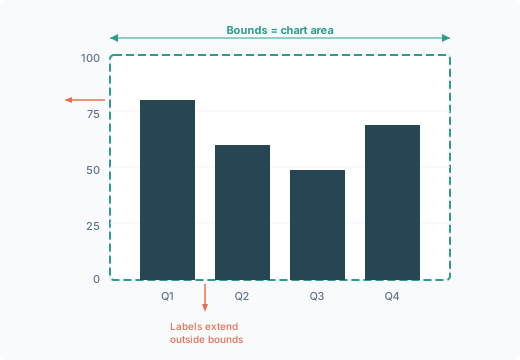
This is useful when:
- Multiple charts on a slide need visually aligned chart areas
- Label lengths vary between charts, but the data areas should line up
#Contain within bounds (off)
With the toggle off, the chart area shrinks to make room for axis labels. The total footprint never exceeds the bounds you set.
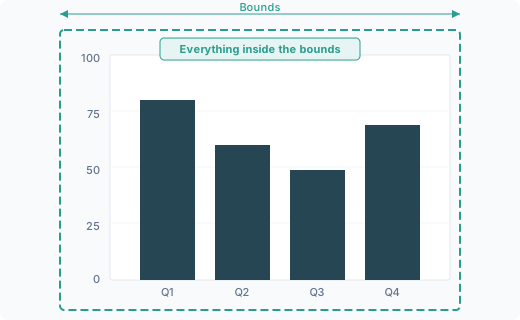
This is useful when:
- Placeholders have tight spacing and nothing should overlap
- You need the outer edge of the chart to align with other slide elements like titles or text boxes
#Align multiple charts
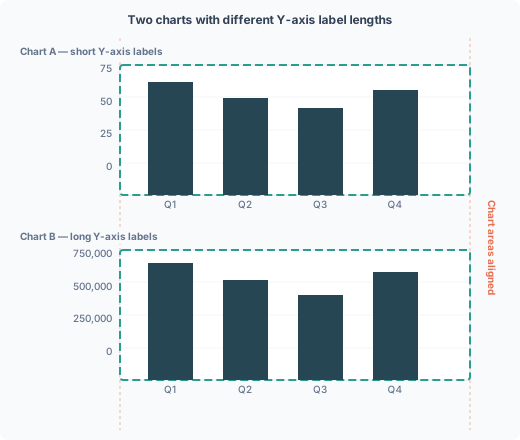
The main reason to keep Fixed chart area on is alignment. When two charts have different label lengths, turning the toggle off pushes each chart area inward by a different amount. The data areas end up misaligned.
With Fixed chart area on for both charts, the chart areas stay aligned regardless of how long the labels are.
#When to use each mode
| Scenario | Mode |
|---|---|
| Multiple charts that need matching data areas | Fixed chart area (on) |
| Labels vary in length across charts | Fixed chart area (on) |
| Dashboard-style slides with many charts | Fixed chart area (on) |
| Charts in tight slide layouts where nothing should overlap | Contain within bounds (off) |
| Aligning chart outer edge with titles or text boxes | Contain within bounds (off) |